EM777 App Download APK: Android & iOS Installation Guide
Download the authentic, malware-free EM777 mobile client for Android or configure the streamlined Progressive Web App (PWA) on iPhone. Experience faster graphics rendering, reduced mobile data usage, fingerprint login, and automatic ISP mirror routing.
Executive Summary: EM777 Mobile Client Overview
The EM777 mobile application allows Philippine players to access digital slots, live dealer streams, arcade fishing games, and sports betting directly from a dedicated mobile dashboard. Because real-money gambling applications face strict distribution restrictions on the Google Play Store and Apple App Store in the Philippines, EM777 provides its software through an official direct Android Package Kit (APK) and a lightweight iOS Progressive Web App (PWA) shortcut.
| Parameter | Android Specifications | iOS Specifications |
|---|---|---|
| Distribution Format | Direct .apk package file |
Progressive Web App (PWA / WebClip) |
| Minimum OS Version | Android 7.0 (Nougat) or higher | iOS 13.4 or higher |
| Recommended OS | Android 11.0+ | iOS 16.0+ |
| Storage Required | ~35 MB initial (~90 MB uncompressed) | < 5 MB (Cached asset shell) |
| RAM Requirement | 2 GB minimum (3 GB+ for live casino) | 2 GB minimum |
| Supported Browsers | Chrome, Samsung Internet, Brave | Apple Safari (required for Home Screen add) |
| Security Encryption | 128-bit SSL / TLS 1.3 Transport | Safari Sandboxed WebKit Storage |
Step-by-Step Android APK Installation Walkthrough
Installing an APK outside the Google Play Store requires granting temporary installation permissions on your Android device. Follow these four straightforward steps:
Download APK
Tap the gold "Download Android APK" button and allow the ~35MB package file to download to your device storage.
Allow Unknown Apps
Open Android Settings > Special App Access > Install Unknown Apps. Select Chrome and toggle "Allow from this source".
Run Installer
Tap the completed em777_release.apk in your notification shade or Downloads folder and select "Install".
Launch & Play
Open the newly installed app, enter your credentials or register, and claim your initial ₱77 free trial bonus.
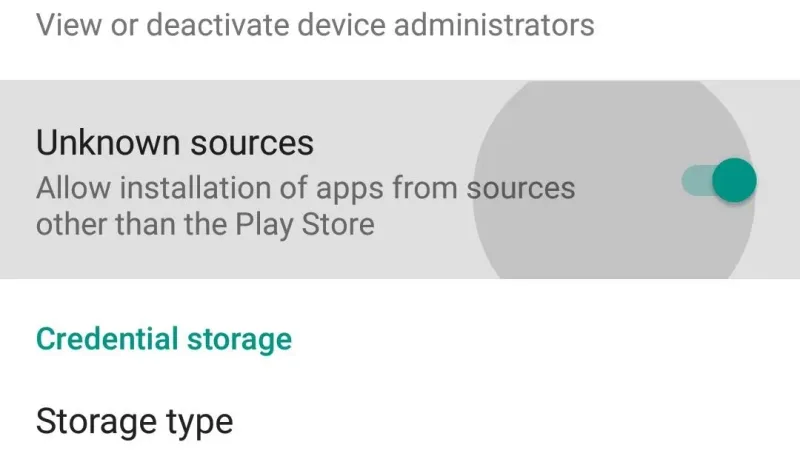
Android System Settings Toggle for Install Unknown Apps
Step-by-Step iOS (iPhone / iPad) Web App Configuration
Because Apple restricts gambling applications on the regional App Store, EM777 utilizes a streamlined Progressive Web App (PWA) framework. This places a full-screen app icon on your iPhone home screen without requiring any file downloads or jailbreaking:
- Open Safari on your iPhone (PWA setup only functions via Safari, not Chrome on iOS).
- Navigate to the mobile version of the EM777 platform.
- Tap the Share button located in the center of the bottom Safari toolbar (the square icon with an arrow pointing up).
- Scroll down the action sheet and tap "Add to Home Screen".
- Keep the default title as "EM777" and tap "Add" in the top-right corner.
- The EM777 icon now appears alongside native apps and launches in standalone full-screen mode without browser address bars.
Diagnostic Error & Solution Matrix
| Error Code / Event | Root Cause | Verified Resolution |
|---|---|---|
| "Parse Error" | Incomplete download or Android version below 7.0 | Delete the corrupted file, clear browser cache, and re-download from our direct link. |
| "Blocked by Play Protect" | Standard Google warning for apps outside Play Store | Tap "More Details" > "Install Anyway". EM777 APK is signed and scanned virus-free. |
| "App Not Installed" | Insufficient storage space or conflicting older version | Uninstall previous build, free up at least 150MB of internal storage, and retry installation. |
| "Mirror Sync Delay" | Regional ISP routing block on primary mirror | Restart app to auto-trigger secondary fallback DNS, or toggle device Wi-Fi to mobile data. |
App Download Frequently Asked Questions
Common technical questions regarding Android APK and iOS mobile gaming.
Yes. The APK builds distributed through EM777 are packaged with clean digital certificates, verified via VirusTotal, and transmit all player data over 128-bit SSL encrypted channels.
Google Play Store policies strictly limit real-money gambling applications in the Philippines to domestic government-accredited operators. Direct APK distribution ensures continuous player access without store restrictions.
Yes. By utilizing the Safari "Add to Home Screen" Progressive Web App feature, you get a full native app icon and standalone screen experience without modifying iOS system files.
When an updated build is released, the app prompts you with an in-app patch notification. You can also re-download the latest stable version directly from this download guide.
Yes. The app seamlessly links with your installed GCash and Maya apps, allowing fast QR screenshot scanning and automated deposit processing.